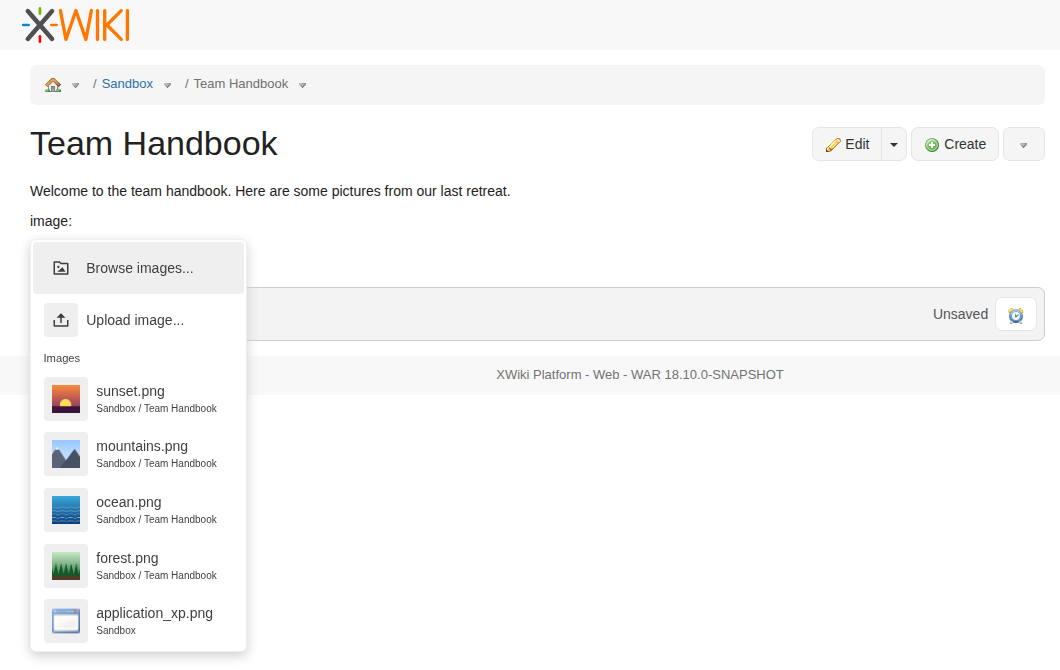
The Image quick action of the BlockNote editor now opens an image suggestion menu, also opened by typing image: followed by a query. It shows:
Browse images..., which opens the Image Wizard;
Upload image..., which opens the file picker, restricted to images, and inserts the uploaded image;
up to 5 images matching the query, with a thumbnail and their location. When nothing is typed yet (right after choosing the quick action) it shows the most recent images, like the CKEditor integration does.
The quick action is shown only when the edited syntax supports images.
Images are saved with a reference relative to the edited document (e.g. [[image:cat.png]], [[image:Other@cat.png]]), like the WYSIWYG editor does, instead of an untyped URL.
The uploaded images are attached to the edited document, which is also passed to the Image Wizard.
The link suggestions show the location of the suggested pages and attachments, and the most recent ones for an empty query.